

If you’re a Gmail power user looking to supercharge your inbox, you’ve likely come across both CMDK and Shortwave. Both promise to transform your email workflow, but they take fundamentally different approaches.
In this comprehensive comparison, we’ll break down the features, pricing, privacy implications, and platform differences to help you make an informed decision about which tool best fits your workflow.
At a Glance: Quick Comparison
| Aspect | CMDK | Shortwave |
|---|---|---|
| Type | Browser extension | Email client |
| Platform | Works within Gmail | Replaces Gmail interface |
| Pricing | $9/mo, $79/yr, $179 lifetime | $7-45/mo (no lifetime) |
| Privacy | No email content access | Full read/write access |
| AI Features | No (uses Gmail’s native AI) | Yes (cloud-based) |
| Mobile App | No | Yes (iOS/Android) |
| Works with Extensions | Yes | No |
| Best For | Desktop users, privacy-focused | AI enthusiasts, mobile users |
What is CMDK ?
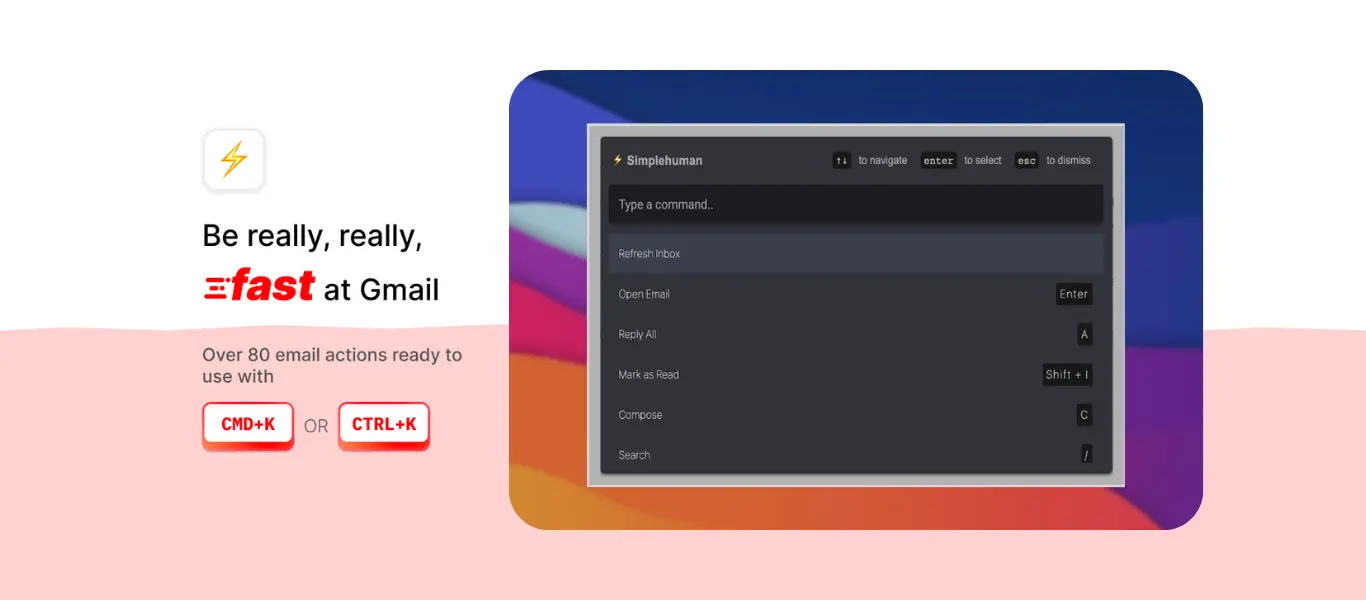
CMDK is a lightweight browser extension that enhances Gmail with keyboard shortcuts, a command bar, and productivity features. The extension works on top of your existing Gmail interface without replacing it.
Core Philosophy: Enhance Gmail’s native capabilities with power-user features while maintaining privacy and compatibility.
Key Features:
- 80+ keyboard shortcuts
- Command bar (⌘+K or Ctrl+K)
- Natural language snooze/reminders
- Read receipts
- Bulk unsubscribe
- Works with other Gmail extensions
- Multiple inbox support
- No email content access required
What is Shortwave?
Shortwave is a complete email client built on top of Gmail that replaces the Gmail interface. Created by ex-Googlers, it positions itself as the spiritual successor to Google Inbox with advanced AI capabilities.
Core Philosophy: Reimagine email with AI-powered organization, summarization, and collaboration features.
Key Features:
- AI email assistant (powered by Claude)
- Smart bundles and splits
- AI-powered search
- Email summarization
- Collaborative features (shared inboxes)
- Mobile apps (iOS/Android)
- Real-time sync with Gmail
- AI writing assistance
Feature-by-Feature Comparison
1. Platform & Compatibility
| Feature | CMDK | Shortwave |
|---|---|---|
| Gmail integration | ✅ Works within Gmail | ✅ Built on Gmail |
| Other email providers | ❌ Gmail only | ❌ Gmail only |
| Chrome/Edge/Brave | ✅ Yes | ✅ Web app |
| Desktop app | ❌ No (extension) | ✅ Mac app |
| Windows app | ❌ No | ❌ No |
| Mobile (iOS/Android) | ❌ No | ✅ Yes |
| Works with Gmail extensions | ✅ Yes | ❌ No |
| Keeps Gmail interface | ✅ Yes | ❌ No (replaces it) |
| Offline support | Limited | Limited |
Winner for Desktop-Only Users: CMDK (keeps Gmail familiar, works with other extensions)
Winner for Mobile Users: Shortwave (has dedicated iOS/Android apps)
2. Privacy & Data Security
| Aspect | CMDK | Shortwave |
|---|---|---|
| Email content access | ❌ No read/write access | ✅ Full read/write access |
| AI processes emails | ❌ No | ✅ Yes (cloud-based) |
| Third-party servers | ❌ No email content sent | ✅ AI processing in cloud |
| Data encryption | N/A (no data collected) | ✅ TLS 1.2+, AES256 |
| Suitable for regulated industries | ✅ Yes | ❌ No |
| Privacy policy | Minimal data collection | Extensive for AI features |
Key Privacy Difference:
CMDK does not require read or write access to your email content. It only tracks which features you use (user activity), not what’s in your emails.
Shortwave requires full access to read, write, and modify your emails. All AI processing happens on third-party cloud servers, which means your email content is sent externally for analysis, summarization, and AI features.
Why This Matters:
- Professionals in healthcare, legal, or finance may be prohibited from using cloud-based AI that processes confidential communications
- Your emails contain sensitive business information, passwords, financial data, and personal conversations
- Data breaches can happen to any company, regardless of security measures
Winner: CMDK (for privacy-conscious users), Shortwave (if you’re comfortable with the trade-off for AI features)
3. Keyboard Shortcuts & Speed
| Feature | CMDK | Shortwave |
|---|---|---|
| Keyboard shortcuts | ✅ 80+ shortcuts | ✅ Gmail shortcuts |
| Command bar | ✅ ⌘+K / Ctrl+K | ✅ Yes |
| Learning curve | Low (builds on Gmail) | Medium (new interface) |
| Speed optimization | ✅ Fast | ✅ Fast |
| Keyboard-first design | ✅ Yes | ✅ Yes |
| Custom shortcuts | ❌ No | ❌ Limited |
Both tools are designed for keyboard-first workflows. CMDK adds many shortcuts to Gmail, while Shortwave maintains Gmail’s existing shortcuts in a new interface.
Winner: Tie (both excel at keyboard navigation)
4. AI Capabilities
| Feature | CMDK | Shortwave |
|---|---|---|
| AI email drafting | ❌ No | ✅ Yes |
| AI summarization | ❌ No | ✅ Yes |
| Smart email categorization | ❌ No | ✅ Bundles |
| AI search | ❌ No | ✅ Yes |
| Writing style learning | ❌ No | ✅ Yes |
| AI scheduling | ❌ No | ✅ Yes |
Shortwave’s AI Capabilities:
- Email summarization
- AI-powered writing assistance that learns your tone
- Smart bundles (automatic email categorization)
- AI search across email history
- Natural language commands for AI assistant
CMDK Approach: Uses Gmail’s native AI features (Gemini-powered Smart Compose, Smart Reply) which are free and built into Gmail.
Important Consideration:
Reviews consistently note that Shortwave’s AI features “often feel slower than handling tasks manually” for simple operations. The AI requires you to explain what you want, and users report anxiety about whether the AI understood correctly, leading to double-checking.
Winner: Shortwave (if you want dedicated AI), CMDK (if Gmail’s native AI is sufficient)
5. Email Organization & Management
| Feature | CMDK | Shortwave |
|---|---|---|
| Natural language snooze | ✅ Yes | ✅ Yes |
| Email scheduling | ✅ Yes | ✅ Yes |
| Read receipts | ✅ Yes | ✅ Yes (paid tiers) |
| Unsubscribe | ✅ Bulk unsubscribe | ❌ One at a time only |
| Labels/folders | ✅ Gmail native | ✅ Synced with Gmail |
| Gmail filters | ✅ Keeps all filters | ❌ Stripped away |
| Gmail stars | ✅ Yes | ❌ Removed |
| Search | ✅ Gmail search | ✅ AI-enhanced search |
| Bundles/categories | ✅ Gmail tabs | ✅ Smart bundles |
Critical Limitation: Shortwave only allows unsubscribing from ONE email at a time, while CMDK offers bulk unsubscribe functionality.
Gmail Feature Compatibility: Shortwave replaces Gmail’s interface and strips away features like custom stars, some filters, and native Gmail organization tools. CMDK preserves everything.
Winner: CMDK (for Gmail feature preservation), Shortwave (for AI-powered organization)
6. Collaboration Features
| Feature | CMDK | Shortwave |
|---|---|---|
| Shared inboxes | ❌ No | ✅ Yes (paid plans) |
| Team comments | ❌ No | ✅ Yes |
| Assignments | ❌ No | ✅ Yes |
| Thread sharing | ❌ No | ✅ Yes |
| Read status for teams | ❌ No | ✅ Yes (Business+) |
Winner: Shortwave (clearly designed for teams)
7. Pricing Comparison
CMDK Pricing
| Plan | Price | Features |
|---|---|---|
| Free Trial | 15 days | Full features, no credit card |
| Monthly | $9/month | All features |
| Yearly | $79/year ($6.58/mo) | All features |
| Lifetime | $179 one-time | All features forever |
Shortwave Pricing
Individual Plans:
| Plan | Monthly | Annual | Limitations |
|---|---|---|---|
| Free | $0 | $0 | 90-day search history, “Sent with Shortwave” signature |
| Personal | $8.50 | $7/mo ($84/yr) | 1-year search history, no signature |
Business Plans:
| Plan | Monthly | Annual | Best For |
|---|---|---|---|
| Pro | $18 | $14/mo ($168/yr) | Up to 3 accounts, 3-year search |
| Business | $30 | $24/mo ($288/yr) | Up to 10 accounts, 5-year search |
| Premier | $45 | $36/mo ($432/yr) | Unlimited, enhanced AI |
| Max | $125 | $100/mo ($1,200/yr) | Enterprise features |
Cost Analysis: 5-Year Comparison
For Individual Users:
- CMDK Lifetime: $179 (one-time payment)
- CMDK Yearly: $395 ($79 × 5)
- Shortwave Personal: $420 ($84 × 5)
- Shortwave Pro: $840 ($168 × 5)
- Shortwave Business: $1,440 ($288 × 5)
Savings: CMDK lifetime saves $241-1,261 over 5 years depending on Shortwave tier.
Important Note: Shortwave’s free plan has significant limitations:
- Mandatory “Sent with Shortwave” signature (cannot be removed)
- Only 90 days of searchable email history
- Basic AI features only
Winner: CMDK (especially lifetime plan), unless you need enterprise AI features
8. Performance & Reliability
| Aspect | CMDK | Shortwave |
|---|---|---|
| Speed | Fast (1.64MB extension) | Fast web app |
| Syncing issues | Rare | Can take days to resolve |
| Stability | Very stable | Some bugs reported |
| Loading times | Instant (uses Gmail) | Fast but rebuilds interface |
| Attachment handling | Gmail native | Permission issues reported |
Known Shortwave Issues:
- Syncing problems during initial import or bulk operations can take days
- Android app has permission issues with attachments
- Notification reliability problems
- Some users report “going back to Gmail” due to management difficulties
Winner: CMDK (fewer reported issues)
Real User Experiences
CMDK Reviews
⭐⭐⭐⭐⭐ Renez Van Autreve
“I’ve been using Superhuman for a long time, so I was hesitant to make the switch. This extension made me realize I was paying a massive monthly subscription just for a clean interface and fast keyboard shortcuts.”
⭐⭐⭐⭐⭐ James Finley
“It does everything I liked about SuperHuman without the pretentious price. It also doesn’t force me to use all of the latest/greatest AI tools that I never wanted or needed.”
Shortwave Reviews
Positive:
“The AI assistant feels like a partner. Email summarization and bundles are genuinely useful. Changed my relationship with email.” (4.8/5 stars)
“As someone with ADHD, Shortwave solved my email paralysis. The AI helps me process hundreds of emails without overwhelm.”
Negative:
“The email management is not easy, I found myself going back to Gmail every time. Eventually didn’t save time so I tried to cancel but even that couldn’t as I missed the refund policy.” (G2 Review)
“AI features are slower than doing things manually for simple tasks. I can draft a reply faster than explaining to AI how I want it to respond.” (Clean Email Review)
Use Case Scenarios
Scenario 1: The Desktop-Only Professional
Need: Process 50-100 emails daily, work primarily on laptop, want keyboard shortcuts
Best Choice: CMDK
Why: You don’t need mobile apps, and CMDK gives you all the productivity features without the monthly subscription cost. Lifetime plan means you’re done paying after $179.
Scenario 2: The Mobile-Heavy User
Need: Check email constantly on phone, need mobile app, travel frequently
Best Choice: Shortwave
Why: Shortwave has polished iOS and Android apps. CMDK has no mobile presence, so you’d be stuck with standard Gmail on mobile.
Scenario 3: The Privacy-Conscious Professional
Need: Handle confidential client information (lawyer, doctor, accountant, journalist)
Best Choice: CMDK
Why: CMDK doesn’t access your email content. Shortwave’s cloud-based AI processing may violate compliance requirements for regulated industries.
Scenario 4: The AI Enthusiast
Need: Want AI to summarize emails, draft responses, and learn your writing style
Best Choice: Shortwave
Why: Shortwave’s AI capabilities are more advanced than Gmail’s native features. However, be prepared for the privacy trade-off and the learning curve.
Scenario 5: The Multi-Tool User
Need: Use Grammarly, Boomerang, or other Gmail extensions alongside productivity tools
Best Choice: CMDK
Why: CMDK works alongside other extensions. Shortwave replaces Gmail entirely, so your other extensions won’t function.
Scenario 6: The Team Manager
Need: Shared inbox management, team collaboration, assigning emails to team members
Best Choice: Shortwave
Why: Shortwave offers robust team features like shared inboxes, assignments, team comments, and read statuses (in Business+ plans). CMDK is designed for individual use.
What You Give Up by Choosing CMDK
Let’s be honest about the trade-offs:
1. Mobile App
- No dedicated mobile app
- You’ll use Gmail’s standard mobile app on your phone
- Keyboard shortcuts don’t translate to mobile
2. Advanced AI Features
- No AI email drafting in your voice
- No automated email summarization
- No AI-powered smart bundles
- You’ll rely on Gmail’s native AI instead
3. Team Collaboration
- No shared inbox features
- No team assignments or comments
- Better suited for individual productivity
4. Separate Email Experience
- You remain in Gmail’s interface
- No redesigned email client experience
- Some users prefer a fresh interface
What You Give Up by Choosing Shortwave
1. Privacy
- Full read/write access to all emails required
- Email content processed by AI on cloud servers
- Cannot be used in regulated industries (healthcare, legal, finance)
- Third-party data processing
2. Gmail Feature Compatibility
- Strips away Gmail filters, custom stars, and some labels
- Cannot use other Gmail extensions (Grammarly, Boomerang, StreakCRM)
- Must adopt Shortwave’s ecosystem entirely
- Some Gmail power features unavailable
3. Cost
- $84-540/year per user vs $79/year (or $179 lifetime) for CMDK
- No lifetime option available
- Free plan has mandatory “Sent with Shortwave” signature
- Feature paywalling (key features locked in expensive tiers)
4. Reliability Concerns
- Syncing issues can take days to resolve
- Some Android app bugs (attachment permissions)
- Users report “going back to Gmail” due to management complexity
- AI features can be slower than manual for simple tasks
5. Limited Unsubscribe
- Can only unsubscribe from one email at a time
- No bulk unsubscribe functionality
- Less efficient for cleaning up inbox
6. Platform Limitations
- Gmail only (no Outlook, Yahoo, etc.)
- No Windows desktop app
- Limited offline functionality
- Search history restricted by pricing tier (90 days to 5 years)
Migration Guide
Switching from Gmail to CMDK
Steps:
- Install the CMDK Chrome Extension
- Start the 15-day free trial (no credit card required)
- Learn the keyboard shortcuts through on-screen prompts
- Your Gmail stays intact, everything syncs automatically
Transition Time: Immediate (works on top of Gmail)
Switching from Gmail to Shortwave
Steps:
- Sign up at shortwave.com with your Gmail account
- Grant Shortwave access to your Gmail
- Wait for initial sync to complete (can take hours to days)
- Learn the new interface and organization system
- Set up bundles and customize your workflow
Transition Time: Several days (includes learning curve and sync time)
Switching from Shortwave to CMDK
Good News: Since both work with Gmail, your emails remain safe in Gmail.
Steps:
- All your emails are still in Gmail (Shortwave syncs back)
- Simply install CMDK extension
- Cancel Shortwave subscription
- Continue using Gmail with CMDK enhancements
No data loss: Everything remains in your Gmail account.
Frequently Asked Questions
Q: Can I use CMDK and Shortwave together?
No. Shortwave replaces the Gmail interface entirely, so the CMDK extension wouldn’t function within Shortwave’s client.
Q: Does Shortwave work with Google Workspace accounts?
Yes, but only on Pro plans and above. The free and Personal plans only support gmail.com and .edu accounts.
Q: Can I try both before deciding?
Yes! Both offer free trials:
- CMDK : 15 days, no credit card required
- Shortwave: Free plan available (with limitations), or paid trial
Q: Which is faster for processing emails?
For simple tasks, users report that both are fast. However, Shortwave’s AI features can be slower than manual actions for basic operations. For complex tasks (summarizing long threads), Shortwave’s AI provides value.
Q: Will my Gmail filters work with both?
- CMDK : Yes, all Gmail filters continue to work
- Shortwave: Some filters may not work as expected, as Shortwave uses its own organization system
Q: Can I export my data from Shortwave?
Yes. Since Shortwave is built on Gmail, all your emails remain in your Gmail account. If you cancel Shortwave, you simply return to using Gmail directly.
Q: Which tool has better keyboard shortcuts?
Both are keyboard-first tools. CMDK adds 80+ shortcuts to Gmail’s existing shortcuts. Shortwave maintains Gmail’s shortcuts within its new interface. The choice depends on whether you prefer enhanced Gmail shortcuts or a new interface with familiar shortcuts.
Q: Does Shortwave’s AI justify the higher cost?
This depends on your needs:
- If you process 100+ emails daily and benefit from AI summaries, it may be worth it
- If you primarily need keyboard shortcuts and speed, CMDK offers better value
- Many users report the AI is “slower than manual” for simple tasks
Q: Can I use CMDK on multiple computers?
Yes. Your subscription is tied to your account, not a device. Install the extension on any Chrome/Brave/Edge browser and sign in.
Q: What happens if Shortwave shuts down?
Your emails remain safe in Gmail. You would lose access to Shortwave’s interface and AI features, but your email data is not held hostage.
Q: Can I use CMDK offline?
Limited. The extension requires an internet connection for most features, as it works within Gmail which requires connectivity.
Q: Does Shortwave support languages other than English?
Shortwave’s AI features are optimized for English. Gmail’s multi-language support remains, but AI features may not work as well in other languages.
The Bottom Line: Which Should You Choose?
There’s no universally “better” option. The right choice depends on your specific needs:
Choose CMDK if you:
- Work primarily on desktop
- Value privacy and don’t want AI processing your emails
- Want to keep using other Gmail extensions
- Prefer lifetime pricing ($179) over subscriptions
- Want bulk unsubscribe functionality
- Work in a regulated industry (healthcare, legal, finance)
- Are satisfied with Gmail’s native AI features
Choose Shortwave if you:
- Need mobile apps for iOS/Android
- Want advanced AI for email summarization and drafting
- Manage team inboxes and need collaboration features
- Process 100+ emails daily and benefit from AI organization
- Are comfortable with cloud-based AI processing of your emails
- Want a completely redesigned email experience
- Have the budget for $84-540/year per user
The Hybrid Approach:
Some users choose to:
- Use CMDK on desktop for privacy and speed
- Use Shortwave’s mobile app when traveling (accepting the privacy trade-off)
- Switch between tools based on project needs
However, this requires paying for both subscriptions.
Our Recommendation
For most Gmail power users who primarily work on desktop, CMDK offers the best value. The lifetime pricing ($179) means you’ll save hundreds of dollars over time while maintaining your privacy and Gmail feature compatibility.
Shortwave excels when you need mobile apps, team collaboration, or advanced AI features. However, be prepared for the privacy trade-offs, higher costs, and the learning curve of a new interface.
The deciding factor for many users comes down to: Do you need mobile email management?
- If yes, consider Shortwave
- If no, CMDK provides better value and privacy
Try both tools’ free trials to see which workflow feels more natural for your email habits.
Final Thoughts
Both CMDK and Shortwave represent significant improvements over standard Gmail. Your choice ultimately depends on whether you prioritize:
- Privacy & Cost: CMDK
- AI & Mobile: Shortwave
The good news? Both integrate with Gmail, so your emails remain safe regardless of which tool you choose. You can switch between them without losing data or worrying about vendor lock-in.
Take advantage of free trials, test both tools with your actual email workflow, and choose the one that saves you the most time without compromising what matters most to you.
Ready to supercharge your Gmail?
- Try CMDK : Install Extension (15-day free trial)
- Try Shortwave: Sign Up (Free plan available)